



Plan
Capture the setup before entry so the original decision can be reviewed later.
ThesisEntryStop-lossTargetRisk
QbarTrade is a plan-first trading journal that keeps your setup, risk, execution, screenshots, notes, emotions and analytics around the same trade—so you can understand why a result happened, not only what the P&L was.
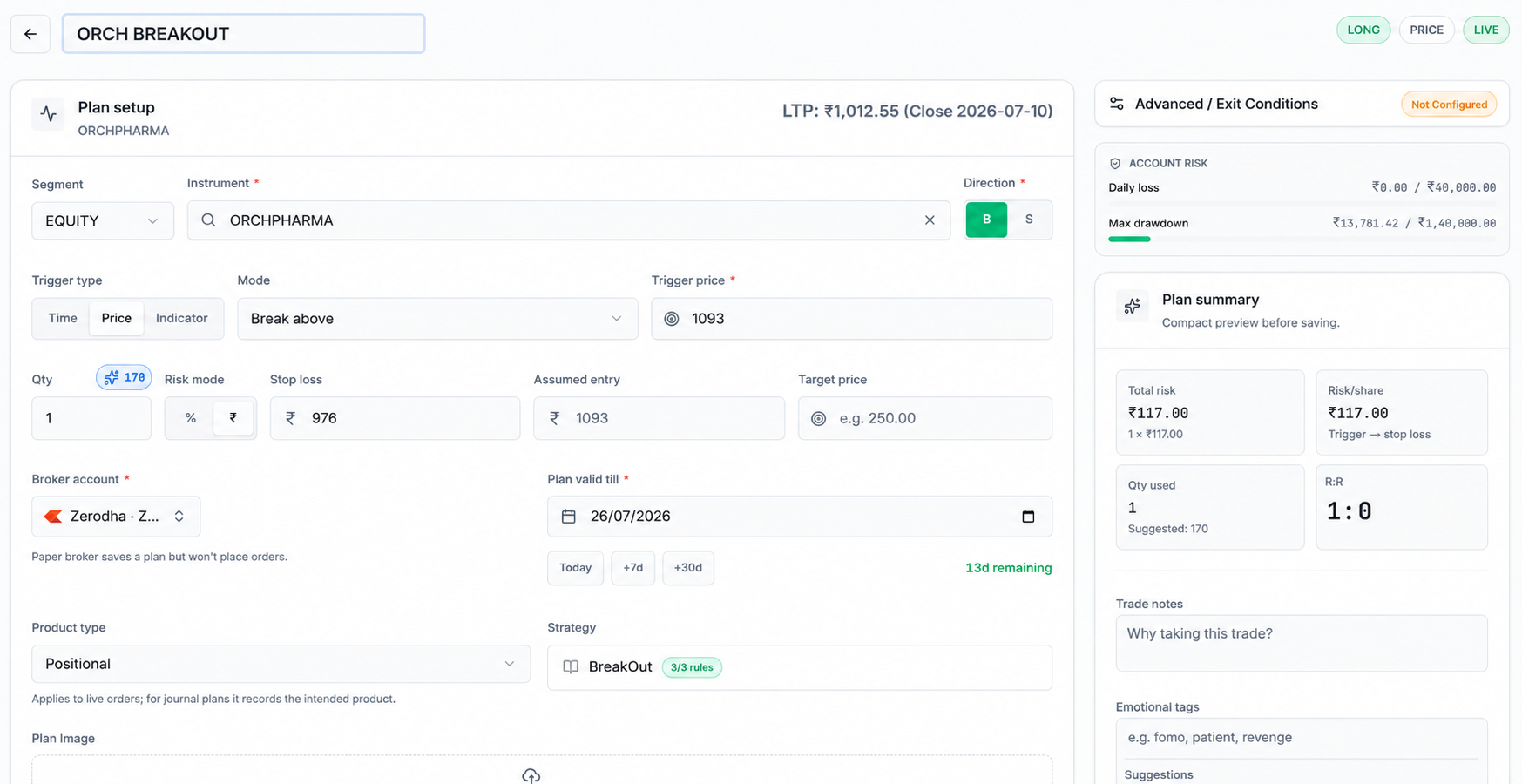
01
Plan
Setup, thesis and risk before entry
02
Execute
Keep the broker fill in context
03
Journal
Notes, screenshots and behaviour
04
Review
Find patterns across a real sample
Why a journal exists
Execution data tells you what happened. Improvement needs the missing context: what you planned, how much you risked, whether you followed the rules and what you learned afterwards.
Broker view
The transaction and the outcome
QbarTrade journal
The decision, execution and review
Trading journal basics
A trading journal is a structured record of the trade and the decisions behind it: why you entered, how much you risked, how the position was managed, what you felt, how you exited and what you learned afterwards.
A basic trade log tells you
A useful trading journal helps answer
From idea to evidence
Keep the plan, execution and review connected so every trade has enough context to teach you something later.
01 · Plan before entry
Define the setup, entry, stop-loss, target, quantity, thesis and planned risk before execution. The journal starts with the decision you intended to make, not only the fill that arrived later.
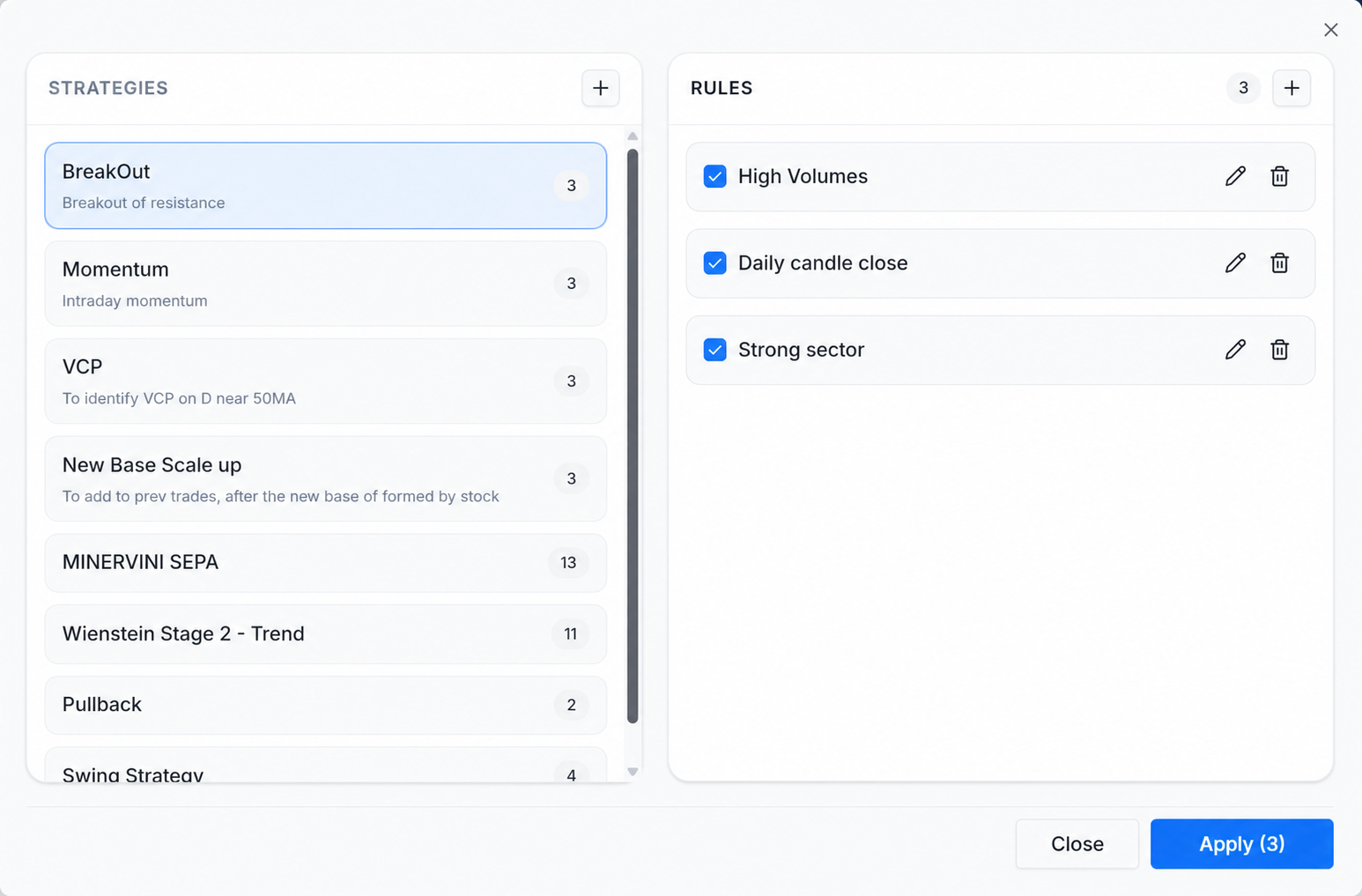
02 · Follow the process
A profitable trade is not automatically a good trade. Keep the checklist behind the setup visible, then compare the plan with what you actually did when the position was live.
03 · Bring the execution back
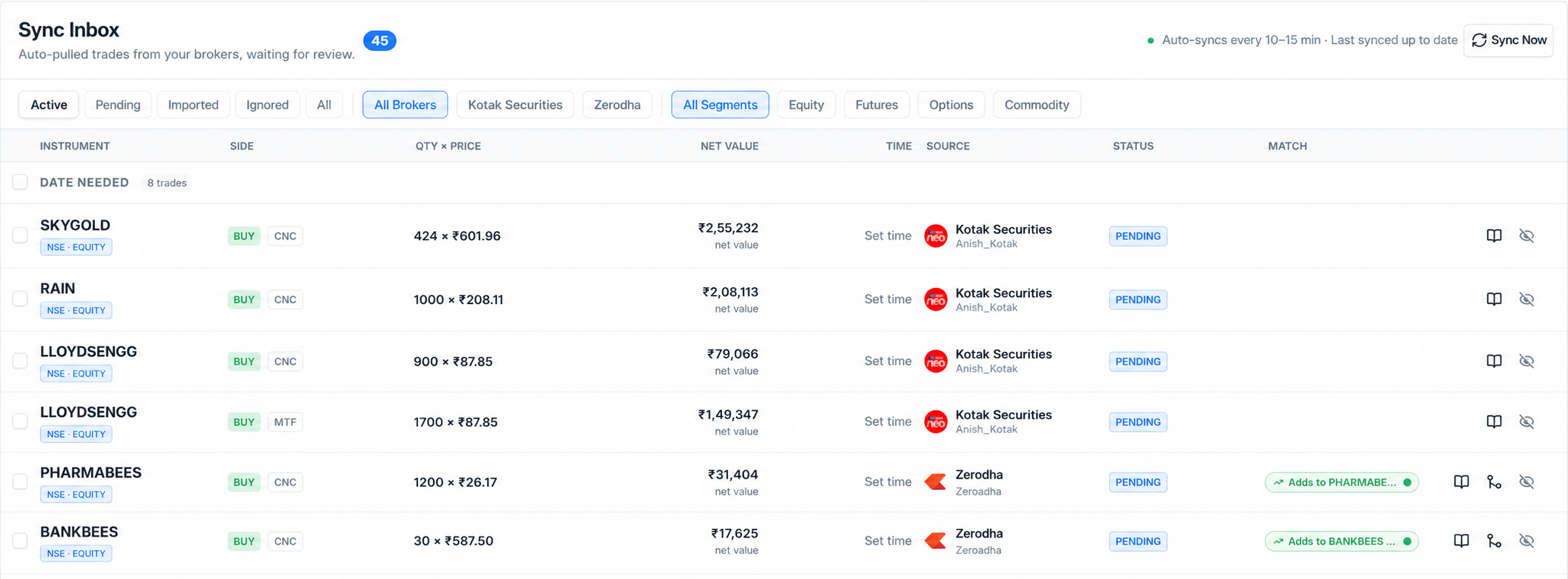
The broker records the execution. QbarTrade reconnects supported activity with the journal workflow so the plan, fills, screenshots, notes and review can live around the same trade.
04 · Build your edge
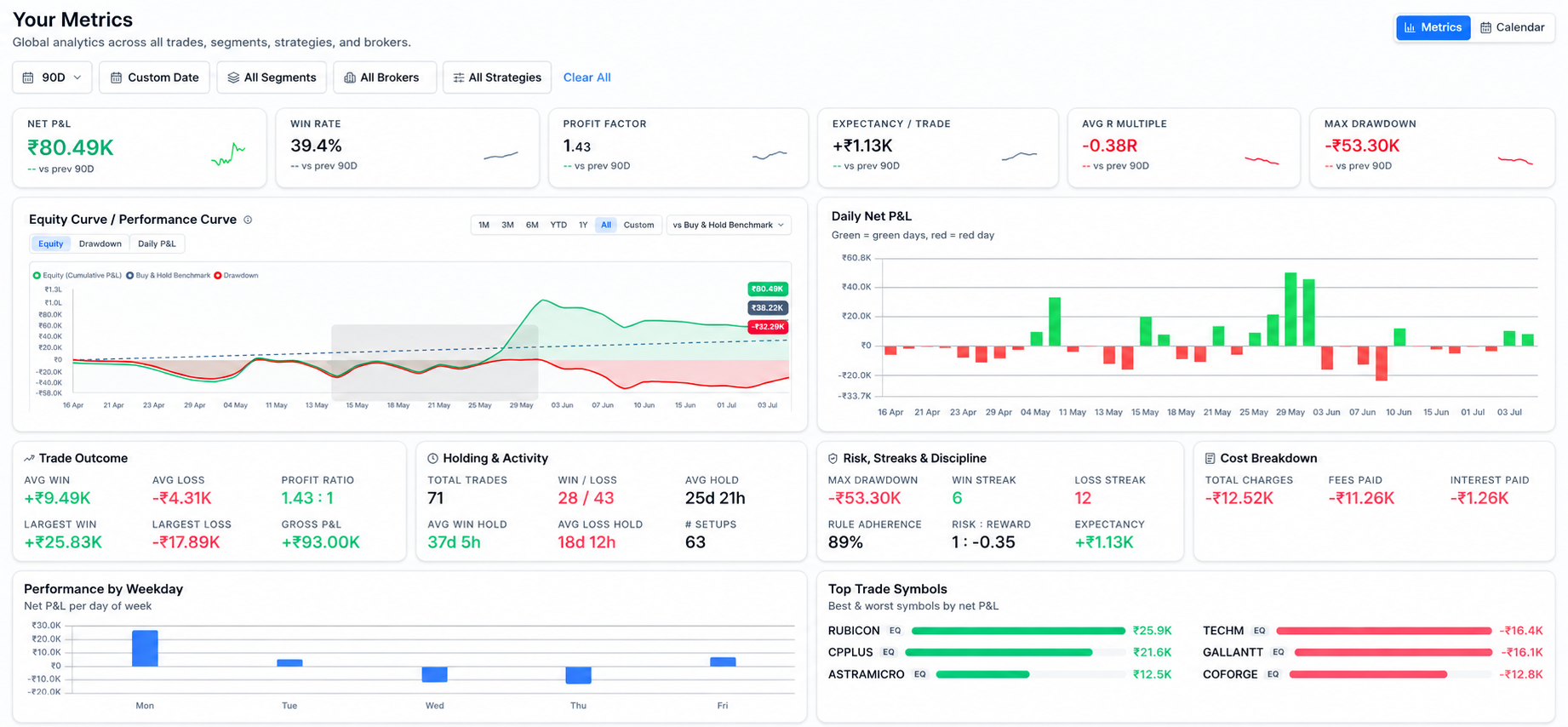
Move beyond a single win or loss. Review strategy performance, expectancy, profit factor, average R, drawdown and behaviour so the journal helps explain where your results actually come from.
What belongs in the journal
A useful trading journal connects four layers: the original plan, the actual execution, the context around the decision and the review after the outcome is known.
Capture the setup before entry so the original decision can be reviewed later.
Keep fills and trade-management decisions connected to the plan they came from.
Record the human part of the trade while the decision is still fresh.
Compare outcome with process and turn the trade into a useful lesson.
Spreadsheet vs software
Excel and Google Sheets can work as basic trade logs. They become harder to maintain when screenshots, structured notes, supported broker imports, behaviour context and strategy analytics all need to stay attached to the same trade.
QbarTrade does not replace the broker. It gives the trade a structured place for planning, journaling and review.
Trading psychology
A trading psychology journal helps you review whether FOMO, hesitation, overtrading, stop changes, early exits or risk escalation repeatedly appear around certain outcomes. It is a behaviour-review tool, not a medical tool.
Do your worst losses come after another losing trade?
Use the journal to look for this pattern across multiple trades.
Do you exit good trades early when you are anxious?
Use the journal to look for this pattern across multiple trades.
Does the strategy fail, or do you execute it poorly?
Use the journal to look for this pattern across multiple trades.
Are your biggest losses rule-following trades or emotional trades?
Use the journal to look for this pattern across multiple trades.
Trading analytics
Your final P&L tells you the result, but not what created it. QbarTrade helps connect performance with your strategy, risk, execution, holding time and behavior so you can understand why trades perform the way they do.
QbarTrade analytics brings performance, risk, activity, cost and strategy data into one review view.
What the numbers tell you
Different metrics answer different parts of the trading process. Looking at them together gives the result context.
EDGE
Use win rate, profit factor and expectancy together to see whether a strategy creates a repeatable statistical edge.
RISK
Average R, risk-reward and drawdown show how efficiently your strategy uses risk and how much pressure it creates.
EXECUTION
MAE, MFE and holding duration show what happened while the trade was open—not just where the final P&L ended.
PATTERNS
Compare strategy, symbol and behavioral context to discover where strong decisions and recurring mistakes cluster.
For Indian traders
QbarTrade is designed for traders who plan and review supported Indian market workflows across equities, F&O, options, futures and MTF. Keep the journal structure consistent even when the instrument or broker workflow changes.
Review option entries, exits, risk and behaviour.
Explore workflowTrack futures decisions, risk and execution quality.
Explore workflowKeep setup, patience and holding-period context together.
Explore workflowTrack funded trades, interest, leverage and real net outcome.
Explore workflowJournal supported commodity workflows with contract context.
Explore workflowReview process
Review at different time horizons so one emotional result does not become a strategy conclusion. The goal is to turn individual trades into evidence about your process.
Compare the plan with the execution while the context is still fresh.
What happened?
Did execution match the plan?
Look for repeated behaviour across the session, not just the largest P&L.
What mistakes repeated?
Were there emotional trades?
Group trades by setup, risk and behaviour to find meaningful patterns.
Which setups performed well?
Which rules were repeatedly broken?
Change the process only after enough trades exist to support the conclusion.
Which patterns are repeatable?
What deserves changing?
Trading journal FAQ
A good journal should be simple enough to maintain and structured enough to make later analysis useful.
A trading journal is a structured record of your trades and the decisions behind them. It captures what you traded, why you entered, how much you risked, how you managed the position, how you exited and what you learned after review.
A journal helps separate outcome from process. One profitable trade can still be badly executed, while a losing trade can still follow the plan. Reviewing both helps identify repeated mistakes, stronger setups and behaviour patterns that ordinary P&L reports miss.
Track the setup, thesis, entry, exit, stop-loss, target, position size, risk-reward, screenshots, emotions, execution notes, mistakes, fees, holding time and post-trade lessons. Add MAE, MFE and strategy metrics where your workflow supports them.
A trade log records the transaction: date, instrument, quantity, entry, exit and P&L. A trading journal adds the process: thesis, setup, risk, screenshots, emotions, rule adherence, mistakes and review notes.
Excel or Google Sheets can work for a basic trade log. They become harder to maintain when screenshots, broker imports, structured notes, behaviour review and strategy analytics need to stay connected to each trade.
Journal close to the trade, keep fields consistent and review on a fixed cadence. Record the plan before entry where possible, then compare planned risk and thesis with actual execution after the trade closes.
QbarTrade is built for Indian traders who want to plan, record, import or sync supported broker activity, journal decisions and review outcomes across supported stock-market workflows such as equities, F&O and MTF.
QbarTrade includes trader workflows and journal structure for options and futures traders, including entries, exits, risk context, trade notes and performance review.
A trading psychology journal can record tags such as FOMO, hesitation, confidence, revenge trading or fear. That context can be reviewed alongside execution and outcome without making medical or psychological claims.
MAE is maximum adverse excursion, or how far a trade moved against you while open. MFE is maximum favourable excursion, or how far it moved in your favour. They can help review exits, stop placement and trade management when available.
QbarTrade supports broker sync and import workflows, including API and file-based flows shown elsewhere on the site. Availability depends on the broker and account workflow, so this page does not claim universal automatic sync.
A trade tracker mainly stores trades and P&L. QbarTrade connects planning, supported broker activity, screenshots, notes, emotions, mistakes, risk, analytics and review so each trade becomes part of an improvement process.
Start reviewing better
Build a plan-first online trading journal where context, risk, notes, screenshots, behaviour and analytics stay connected to the trade.
Start journaling freePlan before you trade
Keep setup, thesis and risk visible before execution.
Bring executions back
Use supported broker or import workflows.
Journal the decisions
Add notes, screenshots, behaviour and mistakes.
Review the patterns
Compare trades by strategy, risk and outcome.