
Flexible
Build the columns, formulas and charts that match your own trading process.
Excel is fine for logging trades. The friction begins when your journal turns into formulas, screenshots, broker exports, notes, and dashboards you have to maintain yourself. QbarTrade keeps the trade, decision context, and review workflow connected in one place

For a trader logging a smaller number of trades, an Excel trading journal or Google Sheets trading journal can be simple, flexible and inexpensive. You choose the columns, formulas, charts and review process.
Build the columns, formulas and charts that match your own trading process.
Most traders already know the basics of Excel or Google Sheets, so setup feels straightforward.
Keep a local file, share it between devices or export the underlying rows whenever you need them.
Entry, exit, quantity, P&L and simple notes are easy to maintain when trade volume is low.
If a spreadsheet is all you need, start with the information that makes the trade reviewable—not just the information the broker already records.
You can extend this with time, market, direction, target, quantity, position size, planned risk, fees, screenshots, rule adherence and review notes. If that workflow remains easy to maintain, a trading journal spreadsheet may be enough.
As trade history grows, the work often shifts from reviewing decisions to maintaining imports, formulas, screenshots, labels and dashboards.
Broker exports, copy-paste cleanup and manual entry create friction before the review has even started.
Win rate, expectancy, drawdown, MAE/MFE and strategy comparisons need formulas, pivots or custom logic that you maintain yourself.
Charts, emotions, notes and execution context often end up in separate folders, tabs or links instead of staying with the trade.
A setup tagged one way today and another way next week makes behavior and strategy analysis harder to trust.
The question is not whether Excel can do these things. With enough formulas and customization, it can. The difference is how much of the workflow you want to build and maintain yourself.
A spreadsheet can store the outcome clearly. The journal becomes more useful when the plan, decisions and review stay attached to that outcome.
Spreadsheet
Date
Jul 29
Symbol
RELIANCE
Strategy
Breakout
Entry
Illustrative
Exit
Illustrative
P&L
+Illustrative
Enough to know what happened. Not always enough to explain why it happened.
QbarTrade
Before
During
After
QbarTrade is useful when you want planning, trade data, journaling and analysis to build on each other instead of living across separate tabs and files.
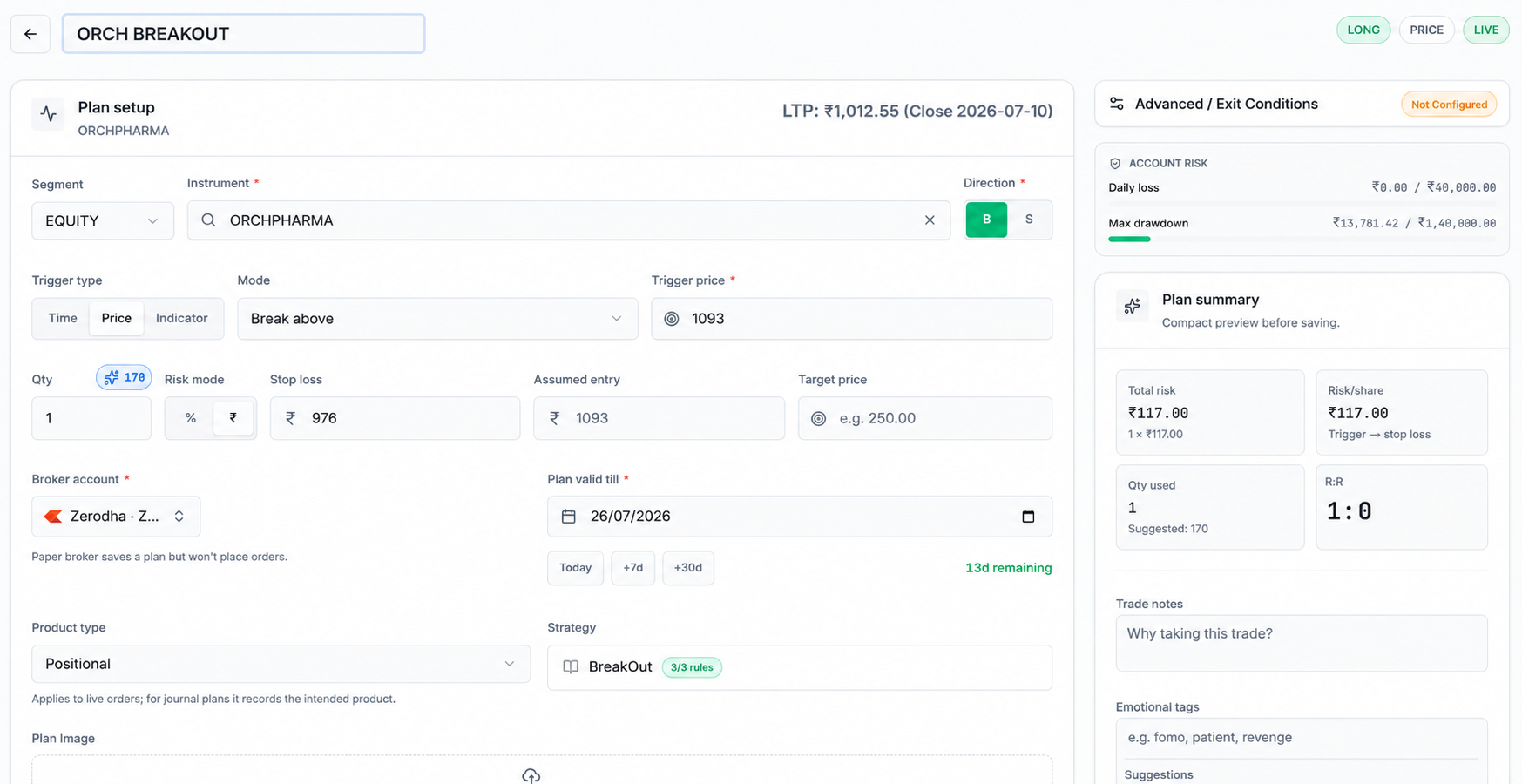
01 / Plan
Plan the setup, direction, entry, stop, target, quantity and risk before execution so the review can compare your original decision with what actually happened.
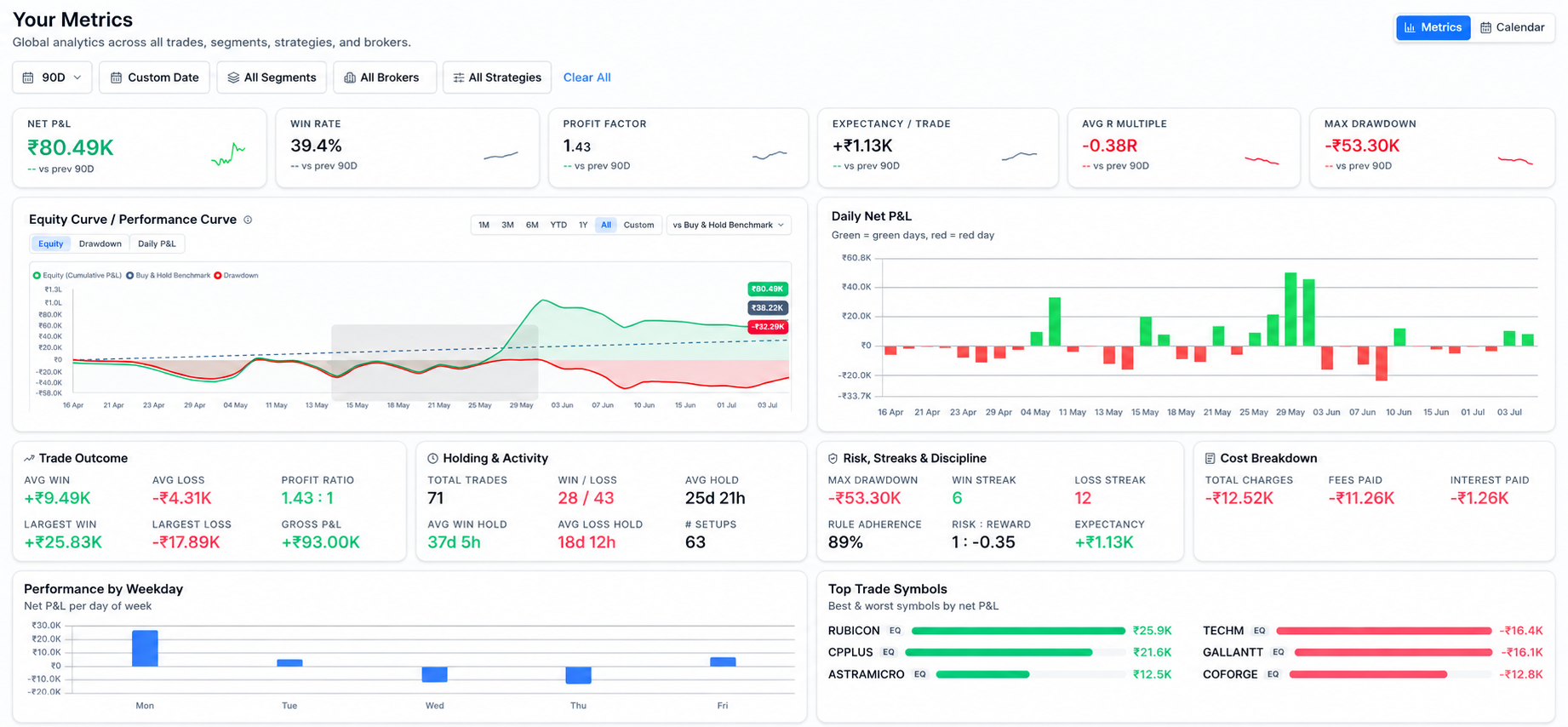
The goal is not to collect more numbers. It is to connect performance with setup quality, risk, exits and behavior so you can understand what created the result.
EDGE
Use win rate, profit factor and expectancy together to see whether a strategy creates a repeatable edge over a meaningful sample.
RISK
Average R, risk-reward and drawdown show how efficiently the strategy uses risk and how much pressure it creates.
EXECUTION
MAE, MFE and holding duration explain what happened while the trade was open instead of reducing the review to final P&L.
PATTERNS
Compare strategy, symbol and behavior context to find where good decisions and recurring mistakes tend to cluster.
Many Indian traders begin with broker exports, Excel tradebooks, P&L statements or contract-note data. QbarTrade is designed to bring supported trade activity into a structured journal where execution data can sit beside planning, risk and review.
Use supported broker, CSV and file workflows instead of turning every review into a cleanup exercise.
Keep equity, F&O and MTF workflows connected to the same planning and journal process where supported.
Use QbarTrade for the structured workflow while keeping spreadsheet exports useful for custom analysis.
The right tool depends on your workflow. A spreadsheet can remain the right answer for a simple log. Dedicated software becomes more useful when the journal itself starts consuming the time you wanted to spend analysing trades.
Stay with Excel when
Consider QbarTrade when
Yes. Excel can work well as a basic trading journal or trade log, especially when you want full control over your columns, formulas and charts. It becomes more demanding when screenshots, broker data, behavior tracking and deeper analytics need to stay connected to every trade.
A useful Excel trading journal can include date, time, symbol, market, direction, strategy, entry, stop, target, exit, quantity, planned risk, risk-reward, fees, net P&L, emotion, screenshots, notes and lessons.
Both can work. Excel is powerful for local analysis and formulas, while Google Sheets is convenient for browser access and sharing. The bigger question is whether you want to build and maintain the review system yourself or use dedicated trading journal software.
A dedicated journal becomes more useful when manual imports, screenshots, formulas, strategy filters and repeated review are taking more time than the analysis itself. The switch is about reducing maintenance, not because spreadsheets are inherently bad.
Excel gives you a flexible canvas. QbarTrade provides a structured trading workflow that connects planning, supported broker activity, screenshots, notes, risk, behavior and analytics so the review process does not have to be rebuilt manually.
QbarTrade supports file-based and broker workflows shown elsewhere on the site, including CSV and Excel-related import paths where supported. Availability depends on the broker and workflow, so QbarTrade does not claim universal automatic sync for every account.
Yes. You can create columns for emotions, mistakes and rule adherence. The challenge is keeping those labels consistent enough to compare them across trades. A structured journal can make that behavior review easier to maintain over time.
QbarTrade is designed for traders who want a structured journal around planning, supported imports, review and analytics rather than maintaining the entire workflow inside a spreadsheet. Indian-market workflows such as equities, F&O and MTF are covered where supported.
QbarTrade currently positions journal data as exportable, including CSV and Excel workflows. Always verify the exact export options available in your account before relying on a particular format.
No. Excel can remain useful for custom analysis or offline work. QbarTrade is useful when you want the day-to-day journal, context and review workflow to stay connected without maintaining every formula and structure yourself.
Use Excel when it fits. Use QbarTrade when you want planning, trade data, screenshots, behavior and analytics to stay connected in one structured review workflow.
Start with QbarTrade